
Step by Step Guide for Setting Up the 4 Channel 3 Megapixel POE Kit (Model D8204-3/PE3020)
The 4 Channel 3 Megapixel POE Kit (Model D8204-3/PE3020) is designed for easy, plug and play installation. With everything you need included in the box, setting up your security system is quick and straightforward. This guide will walk you through each step, ensuring a smooth and hassle free setup.
What’s Included in the Kit:
1 x 4 Channel LZ NVR (Network Video Recorder)
Important!!! 1 x 48 Volt 2 Amp Power Supply (Do not use any other power supply; use the one supplied in the kit)
4 x 20 Meter Network Cables (These cables supply both power and video)
4 x 3 Megapixel IR IP CCTV Cameras
Step 1: Unbox and Check Contents
Before starting the installation, ensure all components are included in your kit. Verify you have the NVR, power supply, cameras, and network cables.
Step 2: Connect the NVR to the Network
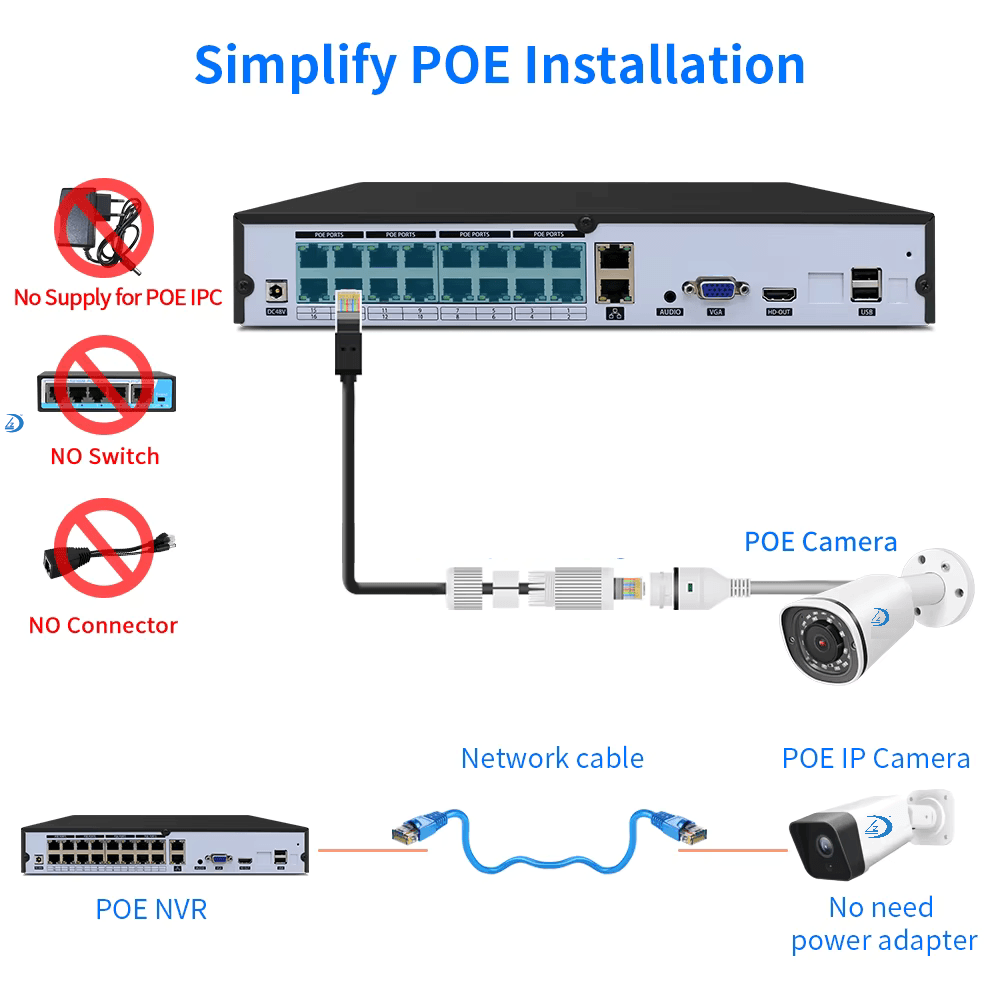
1. Locate the Back Port of the NVR: Find the network port on the back of your NVR. This is where the network cables will be connected to.
2. Connect Network Cable to NVR: Plug one end of the supplied 20meter network cable into the back port of the NVR.
Step 3: Run the Network Cable
1. Run the Cable to Each Camera Location: Use the 20meter network cables to run from the NVR to the desired locations for each camera.
2. Ensure Proper Cable Length: Each camera cable is 20 meters long, so plan your camera placement accordingly.
Step 4: Connect the Network Cable to Each Camera
1. Plug the Cable into the Camera: On each of your 3 Megapixel IR IP CCTV cameras, find the network port and plug the other end of the network cable into the camera.
2. Position the Cameras: Once the cables are connected, you can mount each camera in its desired location. Make sure to secure the cameras properly to avoid any damage.
Step 5: Mount the Cameras
1. Choose Optimal Camera Locations: Select spots for your cameras that provide a clear and wide angle view of the area you want to monitor.
2. Mount Using the Provided Mounting Brackets: Use the included mounting hardware to securely attach each camera in place.
3. Adjust the Camera Angles: After mounting, adjust the camera lenses for the best viewing angle.
Step 6: Power On the System
1. Turn On the NVR: After connecting all the cameras, power on the NVR by plugging it into an electrical outlet using the provided power supply.
2. Cameras Power Up Automatically: Once the NVR is powered on, the cameras will also power up automatically via the POE (Power Over Ethernet) connection.
Step 7: No Configuration Needed
The D8204-3/PE3020 kit is designed for plug and play functionality. No need to configure network settings or IP addresses. The system is preconfigured to work out of the box. Once powered up, the cameras will automatically start streaming video to the NVR.
Step 8: Monitor and Record Video
1. View on NVR: Once the cameras are powered on and connected, you will begin seeing live video on your NVR’s display.
2. Start Recording: The NVR will start recording video from all cameras. You can access the recorded footage at any time through the NVR’s interface. (Hard Drive not included)
Step 9: Secure Your System
1. Change Default Passwords: For added security, it is recommended to change the default password on your NVR and cameras. Follow the instructions in the NVR’s manual to update login credentials.
2. Set Up Remote Access (Optional): If you want to access your cameras remotely, configure your NVR for remote viewing. This may involve setting up the NVR on a mobile app or connecting it to a cloud service.
Additional Tips:
Camera Placement: Ensure cameras are placed at optimal heights to avoid blind spots and ensure full coverage of the monitored area.
Weather Protection: If you are mounting cameras outdoors, ensure they are protected from harsh weather conditions. You may need additional covers or mounts to protect the cameras.
Regular Maintenance: Periodically check the system to ensure all cameras are working correctly, and clean the camera lenses for the clearest image.
By following this step by step guide, you can easily install and start using your 4 Channel 3 Megapixel POE Kit. Whether you’re protecting your home or business, this user friendly system ensures you’re up and running in no time.
If you encounter any issues or need further assistance, consult the user manual for troubleshooting steps or contact customer support.
Enjoy peace of mind with your new security system!